Safari · Mac · How to
Use a VPN only for specific websites in Safari on your Mac
Short answer: Safari has no VPN extensions, and most Mac VPN apps either tunnel everything or split by app, through one country at a time. To send only some websites through the VPN, each in the country it needs, and keep everything else on your normal connection, you need something that routes per website on the Mac itself. Site Routes does that with the VPN you already pay for.
Apple silicon Mac, Safari, macOS 13+. Notarized by Apple. Free for 10 sites and one VPN provider.
Why it's hard
Why a normal VPN setup makes this hard
A Mac VPN app tunnels the whole Mac by default. Connected with no exclusions, every site in every app leaves through that one country. Your bank, your work tools and the site you actually wanted the VPN for all share one exit.
Split tunneling on a Mac is usually per app. It varies by provider: most Mac VPN apps let you exclude whole apps (or offer no split tunneling at all), and Safari is one app, so all your tabs go the same way. A few, such as Windscribe, accept hostname rules, but every rule still shares the one country you are connected to.
Safari has no VPN extensions. VPN extensions for Chrome and Firefox are built on proxy APIs those browsers give extensions (Chrome's, Firefox's). Safari offers no such API (MDN's compatibility table marks it unsupported in Safari), which is why your VPN company ships a Mac app instead.
Your options
Four ways to do it, honestly compared
| Option | Only the sites you pick? | Stay in Safari? | The catch |
|---|---|---|---|
| Turn the VPN on and off by hand | No everything while it's on | Yes | You have to remember, every time, and other tabs ride along. |
| Split tunneling in your VPN app | Rarely usually per app; a few apps take hostnames | Yes | Depends on your provider. Safari counts as one app, and even hostname rules share the one country you are connected to. |
| A second browser with a VPN extension | Yes in that browser | No | You live in two browsers, with two sets of logins and passwords. |
| Per-site routing on the Mac (Site Routes) | Yes per website, per country | Yes | Needs an Apple silicon Mac, one of six supported VPNs and a one-time setup. |
How to set it up
How to route only chosen websites through your VPN in Safari
-
Install Site Routes
Download the app, open it, and turn on its extension in Safari. The setup guide also switches on the small background helper that does the routing.
-
Connect the VPN you already have
NordVPN, Proton VPN, Mullvad, PIA, Windscribe or Red Shield. Site Routes uses your own account's WireGuard access (an access token, a downloaded config file, or a login, depending on the provider). Your VPN credentials are never sent to Humble Tools: sign-in, where needed, goes straight to your provider, and your list of routed sites stays on your Mac.
-
Pick a site and a country
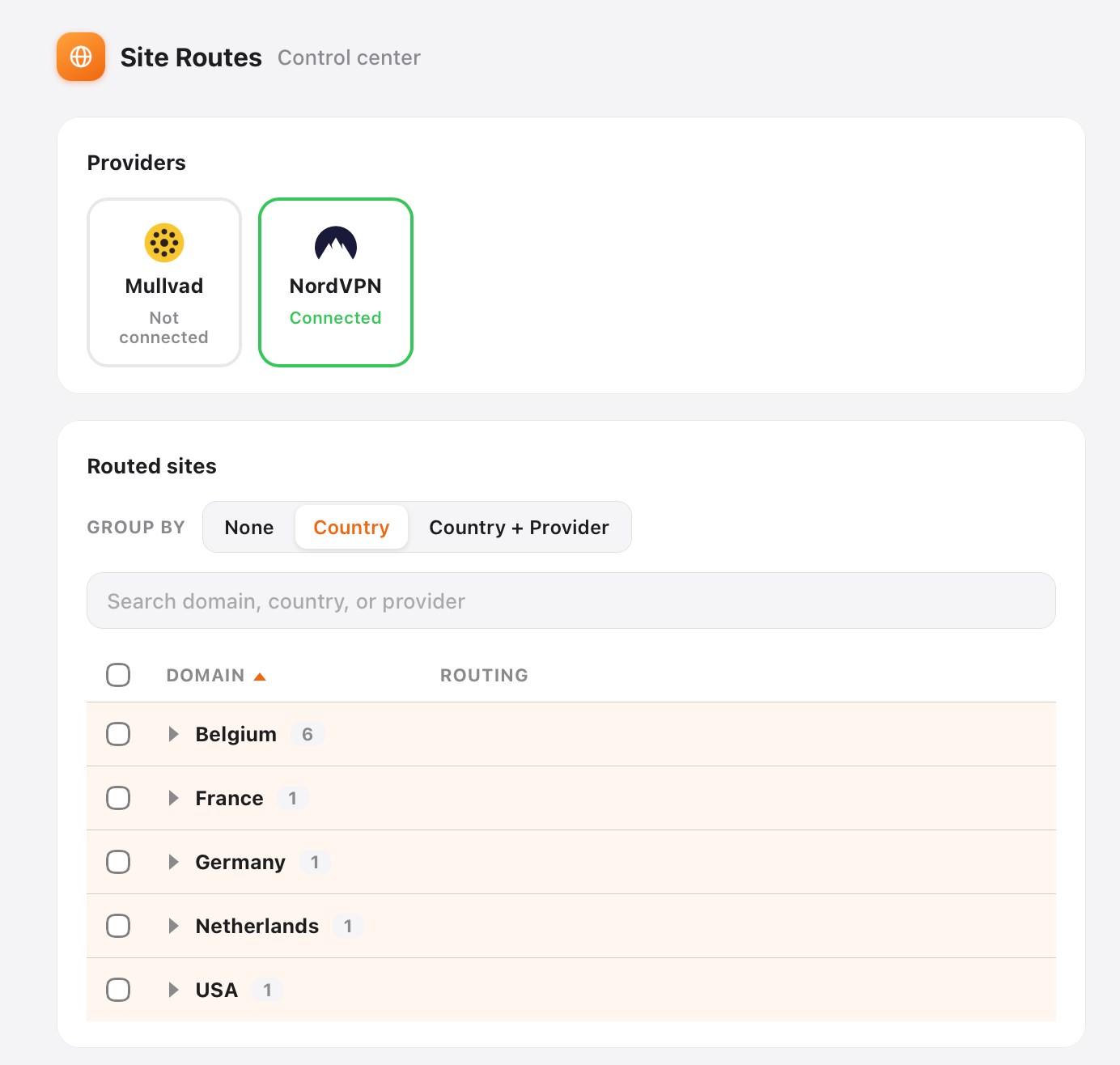
On the site in Safari, use the Site Routes toolbar button (or Settings) to send it through a country, say your bank through Belgium.
-
Forget about it
Next visit, that site uses its route again. Every other site loads over your normal connection, as if no VPN were on.
Know before you install
What it does, and what it doesn't
- It works in Safari on Apple silicon Macs with macOS 13 or later. No Windows, iPhone or iPad.
- You need your own subscription with one of the six VPNs above. Site Routes is not a VPN service.
- Your route list stays on your Mac. No account with us.
- If the VPN for a routed site goes down, Site Routes stops that site and tells you why, instead of quietly loading it over your real connection.
- Changing your IP doesn't change everything else a site checks. A bank or government portal may still ask for a code on your home phone.
- Free for 10 routed sites and one provider. Pro is $19 once for unlimited sites and several providers.
FAQ
Questions people search for
Is there a VPN extension for Safari on Mac?
No. Chrome and Firefox give extensions a proxy API, which is how VPN browser extensions work. Safari does not offer that API, so VPN companies ship a Mac app instead, and that app works for the whole Mac, not per tab.
Can I split tunnel by website on a Mac?
Sometimes, and it depends on your VPN. Most Mac VPN apps split by app or not at all, and Safari is one app. A few, such as Windscribe, accept hostname rules, but every rule shares the one country you are connected to. Site Routes routes per website and lets each site use its own country.
Do I need to buy a new VPN?
Not if you already have NordVPN, Proton VPN, Mullvad, PIA, Windscribe or Red Shield: Site Routes uses that subscription. If you have none of these, you need one of them first.
Can different sites use different countries?
Yes. Each site gets its own country, so your bank can go through Belgium while a shop goes through the UK and everything else stays direct.
What does Humble Tools see?
Not your sites and not your VPN login. The app checks for updates, sends anonymous usage and setup counts, and, if routing cannot recover, a short diagnostic without your site list. The privacy page lists exactly what is sent and what you can turn off.
Route one site. Leave the rest alone.
Free for 10 sites. Uses the VPN you already pay for. Works in Safari.